|
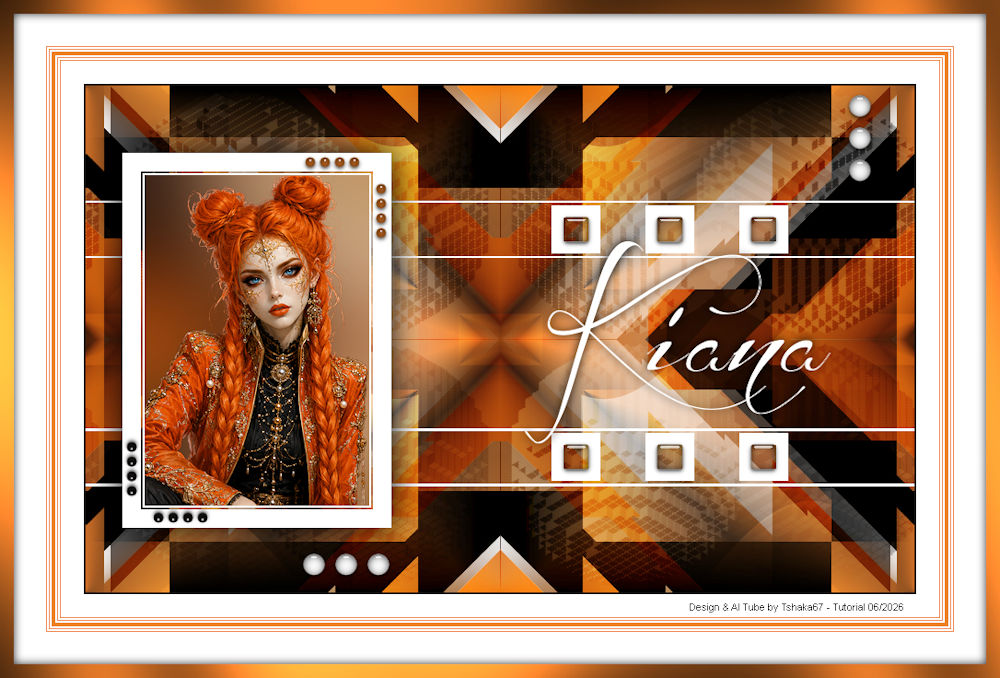
(imagem original de Tshaka)
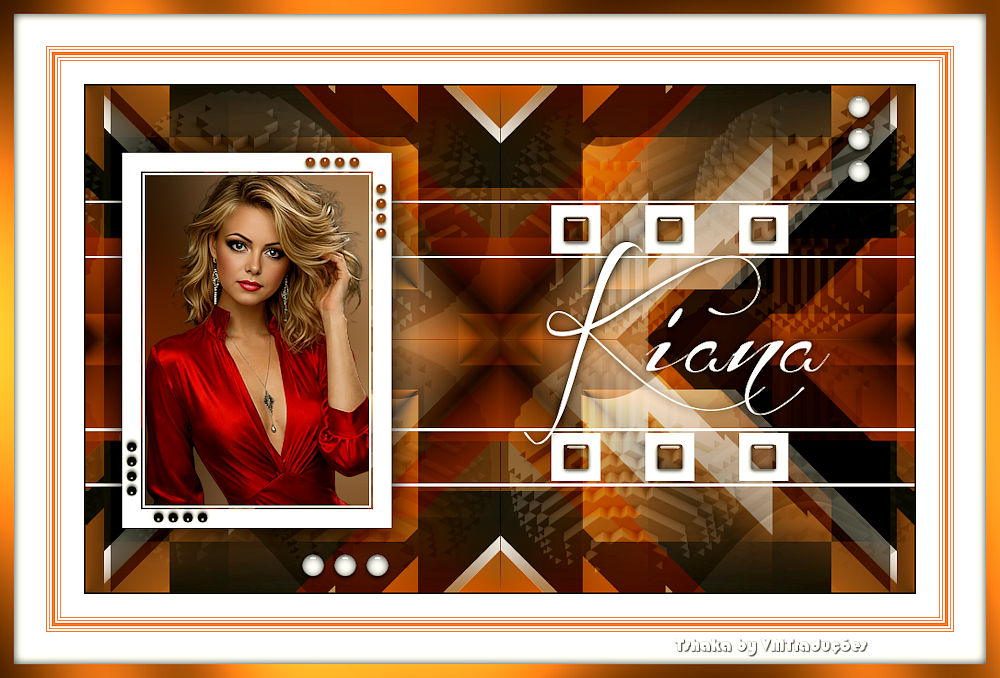
(minha versão)

This tutorial is from Tshaka who I thank for
letting me translate their tutorials.
Original here

Tubes

Material

Plugins
Simple - Unlimited 2 - Flaming Pear
- Toadies - Eye Candy 5: Impact - Greg's Factory Output Vol.II
You can find these plugins on the websites of:
Renée
Cloclo
You can also find this tutorial translated into these languages:
(Click on the flag)


|
Notes:
> Open the material / Duplicate (shift+d) / Close the originals
> Change the blend mode of the layers to match their colors.
> In older versions of PSP, Mirror Horizontal=Mirror / Mirror Vertical=Flip /
Pick tool=deformation
> Open the masks in psp and
minimize
>Adjust the size of the tubes according to your images
|
SCRIPT
Images used:
1 female tube
***
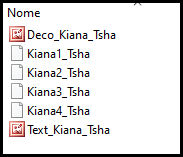
Materials
***
My images
***
Place the selections in the PSP Selections folder
***
1
Colors
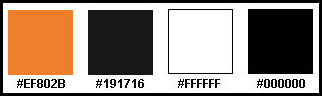
Open your tube, the decorative element, and the text in PSP
Choose a bold color for the foreground and a dark color for the
background
2
Prepare this gradient
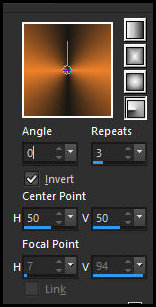
Open a new transparent image, 500x550px
Fill with the gradient
3
Image - Canvas Size: 900x550 0 0 200 200
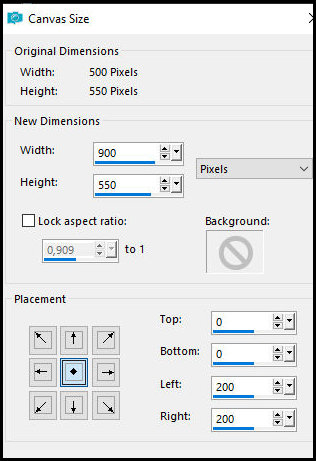
4
Effects - Geometric Effects - Skew - background color
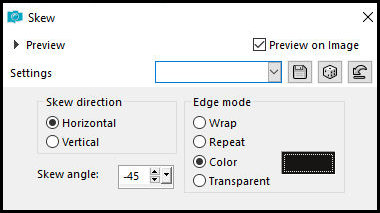
5
Effects - Plugins - Simple - Half Wrap
6
Effects - Plugins - Mura's Meister - Copies
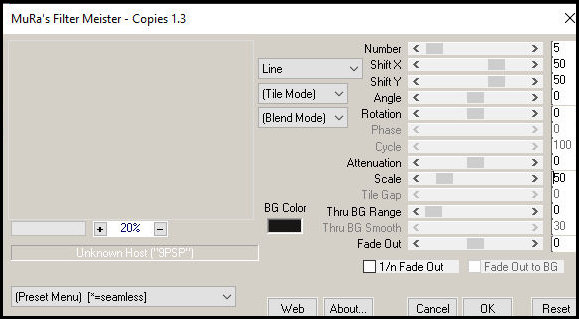
7
Effects - Image Effects - Seamless Tiling - Preset [side by side]
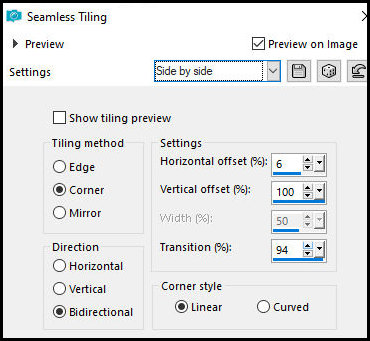
8
Layers - Duplicate
Effects - Plugins - Unlimited 2 - <bkg kaleidoscope> - 4 Qflip
ZBottomR - Default
Layers - Arrange - Move Down
9
Activate the top layer - Raster 1
Effects - Plugins - Unlimited 2 - <Bkg Kaleidoscope> - 4 QFlip
UpperL - Default
Blend Mode: Soft Light
10
Add a new layer
Effects - Plugins - Flaming Pear - Flexify 2
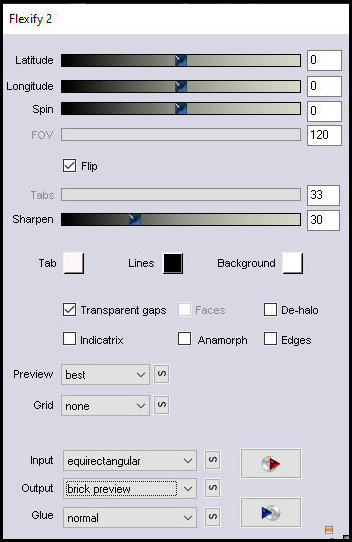
11
Effects - Image Effects - Seamless Tiling - same as before
12
Blend mode: Soft Light
Layers - Arrange - Move Down
13
Activate the top layer
Selections - Load selection from disk - selection [Kiana1-tsha]
14
Add a new layer
Fill the selection with white
Select none
16
Effects - Plugins - Unlimited 2 - Toadies - Weaver
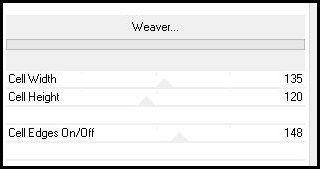
17
Effects - Distortion Effects - Wave
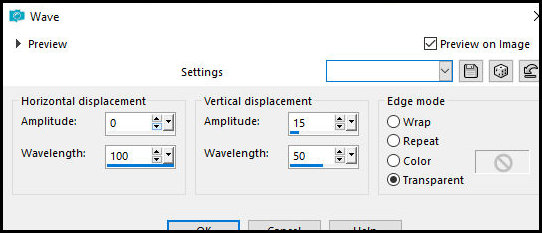
18
Layers - Duplicate
Image - Mirror Horizontal
Merge down
19
Effects - Image Effects - Seamless Tiling
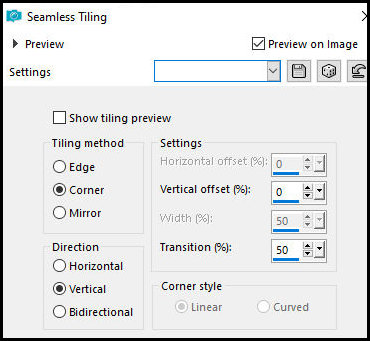
20
Blend mode: Overlay - Opacity: 60/70%
Merge all
21
Selections - Load selection from disk - Selection [Kiana2-Tsha]
Selections - Promote selection to layer
22
Add a new one layer
Fill the selection with white
Selections - Modify - Contract: 20px
Press Delete
23
Selections - Modify - Contract: 2
Fill the selection with white
Selections - Modify - Contract: 2
Press Delete
24
Activate the middle layer - Promoted Selection
Adjust - Blur - Gaussian Blur: 55
25
Copy your main tube
Paste as a new layer
26
Adjust the tube size
Adjust - Sharpness - Sharpen
Move to the center of the frame
Selections - Invert
Press Delete
Select None
27
Activate the top layer - Raster 1
Merge Down
Merge Down - once more
28
Drop Shadow: 0 0 100 55 Black
29
Copy [Deco_Kiana_Tsha]
Paste as a new layer
Effects - Image Effects - Offset [0/(-5)]
30
Selections - Load Selection from Disk - Selection [Kiana3-Tsha]
31
Effects - Plugins - Eye Candy 5: Impact - Glass - Preset [Clear] -
default
Select None
Layers - Arrange - Move Down
32
Activate the top layer - Promoted Selection
Selections - Load Selection from Disk - Selection [Kiana4-Tsha]
33
Add a new layer
Fill the selection with the foreground color
Select None
Effects - Plugins - Eye Candy 5: Impact - Glass - Preset [Clear] -
default
34
Add a new layer
Selections - Load Selection from Disk - Selection [Kiana4-Tsha]
Again
Fill the selection with the background color
Select None
Effects - Plugins - Eye Candy 5: Impact - Glass - Preset [Clear] -
default
35
Image - Mirror Vertical
Image - Flip Horizontal
Effects - Image Effects - Offset [(-194)/(-2)]
36
Copy [Text_Kiana_Tsha]
Paste as a new layer
Effects - Image Effects - Offset [94/1]
37
Image - Add Borders - 2px - background color
Image - add borders - 25px - white
Image - add borders - 1px - foreground color
Image - add borders - 2px - white
Image - add borders - 1px - foreground color
Image - add borders - 2px - white
Image - add borders - 4px - foreground color
Image - add borders - 2px - white color
Image - add borders - 1px - foreground color
Image - add borders - 2px - white
Image - add borders - 1px - foreground color
Image - add borders - 35px - white
38
Selections - Select all
Image - Add borders - 15px - foreground color
Selections - invert
39
Effects - Plugins - Unlimited 2 - Greg's Factory Output Vol. II -
Pool Shadow - default
40
Drop shadow: 0 0 80 15 black
Select none
41
Put credits
Merge all
Save as jpeg

|